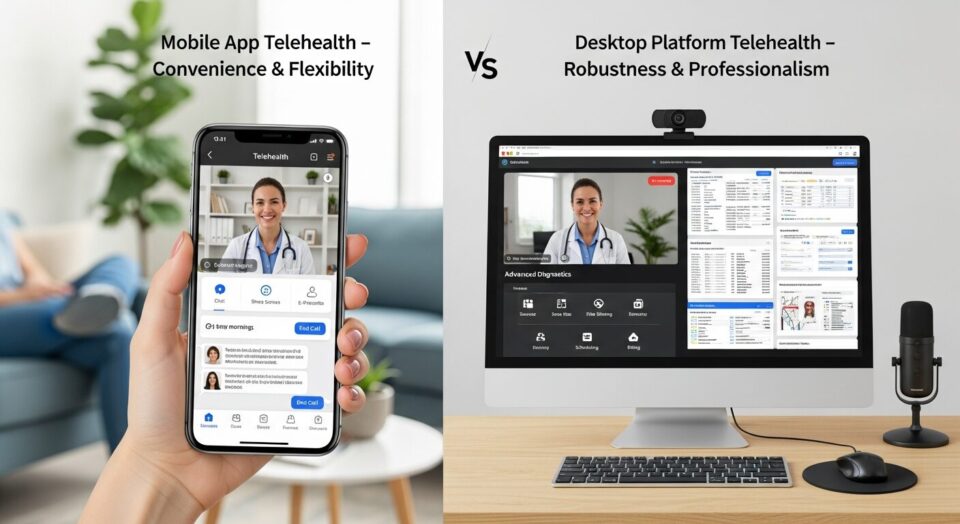
Healthcare leaders are choosing mobile telehealth over desktop solutions, but it’s not just about convenience. Mobile devices unlock unique capabilities that fundamentally change workforce health monitoring—and the productivity gains are measurably superior.
Key Takeaways
- Mobile telehealth apps access unique device features like GPS tracking, biometric authentication, and camera integration that desktop platforms cannot reach, transforming workforce health monitoring capabilities.
- Healthcare IT decision-makers find that mobile device features drive superior staff productivity gains and patient engagement compared to desktop-only telehealth solutions, according to industry surveys.
- Security concerns around mobile workforce solutions can be effectively managed through HIPAA-compliant strategies and multi-layered protection protocols.
- ROI analysis consistently favors mobile telehealth implementations for workforce solutions, despite higher initial developm
Device-Specific Features Transform Workforce Health Monitoring
The healthcare technology landscape has reached a pivotal moment where mobile app capabilities significantly outpace what desktop telehealth platforms can deliver. While desktop solutions have served as the foundation for digital health initiatives, mobile devices unlock an entirely different tier of functionality through native hardware integration. Healthcare organizations are discovering that mobile apps don’t just replicate desktop experiences—they fundamentally transform how workforce health monitoring operates.
Mobile telehealth carts extend the reach of healthcare professionals, allowing a single provider to monitor multiple patients remotely while addressing critical labor shortages. Industry surveys reveal that approximately two-thirds of healthcare leaders cite improved staff productivity and workflows as their primary driver for mobile adoption. TelehealthWatch provides detailed analysis of how these mobile-first approaches are reshaping workforce efficiency metrics across healthcare organizations.
The distinction becomes clear when examining device-specific capabilities that desktop platforms cannot access. Mobile devices have become the preferred computing choice for healthcare professionals needing rapid information access at the point of care, sometimes completely replacing traditional desktop systems. This shift represents more than convenience—it’s a fundamental change in how healthcare delivery operates in modern work environments.
GPS Integration Enables Real-Time Workforce Tracking
Location-Based Care for Remote Workers
GPS integration transforms how healthcare organizations serve distributed workforces, particularly in industries where employees work across multiple sites or remote locations. Mobile health apps can automatically detect when workers enter specific geographic zones, triggering location-appropriate health protocols or safety reminders. This capability proves especially valuable for construction, transportation, and field service industries where traditional healthcare access remains limited.
Location data enables personalized healthcare guidance platforms that offer expertly crafted provider recommendations via mobile apps, ensuring access to in-network and online doctors based on the worker’s current position. The system can automatically suggest the nearest urgent care facilities, pharmacies, or telehealth-enabled providers when health concerns arise during work hours.
Emergency Response and Safety Monitoring
Real-time location tracking becomes critical during workplace emergencies or health incidents. Mobile apps can instantly transmit worker locations to emergency responders, potentially saving crucial minutes in life-threatening situations. Some advanced implementations combine GPS data with other sensor inputs to detect potential safety hazards or unusual movement patterns that might indicate a medical emergency.
Geographic data also supports proactive safety interventions. Apps can identify workers entering high-risk areas and automatically provide relevant safety protocols or health precautions specific to environmental conditions like extreme temperatures, chemical exposures, or altitude changes.
Privacy Regulations and Employee Consent Requirements
Location tracking in workforce applications requires careful navigation of privacy regulations and employee consent frameworks. Organizations must implement transparent opt-in processes that clearly explain how location data will be used, stored, and protected. HIPAA compliance becomes particularly complex when location information intersects with health data.
Best practices include providing granular control over location sharing, allowing employees to disable tracking during off-hours, and implementing automatic data purging schedules. Clear policies must address cross-border data transmission for international organizations and comply with varying regional privacy laws.
Biometric Authentication Streamlines Secure Access
HIPAA Compliance Through Security Strategy
Biometric authentication on mobile devices provides a security advantage that desktop systems struggle to match consistently. Fingerprint scanners, facial recognition, and voice authentication create multi-factor security layers that are both more convenient and more secure than traditional password-based systems. Healthcare organizations report that biometric systems reduce unauthorized access incidents while improving user compliance with security protocols.
Mobile devices accessing healthcare systems through VPNs require additional endpoint security to prevent data breaches, especially when personal devices are used. However, biometric authentication helps ensure that only authorized users can access sensitive health information, even if devices are lost or stolen. The integration of hardware-level security features like secure enclaves provides additional protection layers that desktop environments cannot easily replicate.
Implementation Challenges and Biometric Data Protection
While biometric authentication offers security advantages, implementation requires careful consideration of data protection protocols. Organizations must decide whether to store biometric templates locally on devices or in centralized systems, each approach carrying distinct security and privacy implications.
Technical challenges include ensuring biometric systems work reliably across diverse user populations and various environmental conditions. False rejection rates can frustrate users and reduce system adoption, while false acceptance rates compromise security. Regular calibration and system updates help maintain optimal performance while meeting evolving security standards.
Camera Integration Expands Clinical Capabilities
Visual Health Assessments with Patient Consent
Mobile camera integration enables visual health assessments that desktop telehealth systems cannot provide effectively. Healthcare professionals can guide workers through self-examinations, photograph potential health concerns, and document workplace injuries in real-time. This capability proves particularly valuable for occupational health scenarios where immediate visual documentation is crucial.
Mobile video teleconsultation, integrated with medical equipment, can expand workers’ occupational health coverage, providing personalized healthcare counseling. Studies show that video-based consultations create stronger patient-provider relationships compared to phone-based interactions, with healthcare professionals able to observe visual cues and demonstrate physical therapy exercises or safety procedures.
Document Scanning and Medical Records
Mobile cameras transform document management for workforce health programs. Workers can instantly capture insurance cards, prescription bottles, or medical forms, with optical character recognition automatically extracting relevant information into health records. This eliminates manual data entry errors and speeds up administrative processes.
Advanced implementations use camera technology to verify medication compliance by scanning prescription labels and pill identification. Some apps can even detect potential drug interactions by analyzing multiple medication images simultaneously.
Video Quality Optimization Within Bandwidth Constraints
Mobile apps can dynamically adjust video quality based on available bandwidth, ensuring reliable connections even in areas with limited network coverage. Desktop systems typically require consistent high-bandwidth connections, making them less suitable for workers in remote locations or areas with variable network infrastructure.
Compression algorithms optimized for mobile networks maintain clinical-quality video while minimizing data usage. This becomes crucial for organizations with large mobile workforces where data costs and network limitations significantly impact program feasibility.
Mobile Push Notifications Drive Selective Engagement
User-Controlled Health Alerts and Preference Management
Push notifications represent a fundamental advantage of mobile platforms that desktop systems cannot replicate effectively. Mobile technology offers a fast alternative to traditional paging systems, facilitating communication among staff and enabling patients to message or call clinicians directly from their workstations.
Effective notification systems provide granular control over alert types, timing, and frequency. Workers can customize notifications for medication reminders, appointment scheduling, health screenings, or emergency alerts while maintaining the ability to disable non-critical notifications during specific hours or work situations.
Medication Adherence as Part of Broader Strategy
Push notifications significantly improve medication adherence rates when integrated with broader health management strategies. Mobile apps can send personalized reminders based on prescription schedules, track medication supplies, and alert users when refills are needed.
Advanced systems integrate with pharmacy networks to provide real-time medication availability information and can automatically schedule prescription pickups or deliveries. This level of integration creates a seamless medication management experience that desktop platforms cannot match.
Cost-Effectiveness Analysis: Mobile vs Desktop Implementation
Development and Maintenance Investment
While mobile app development typically requires higher initial investment compared to desktop solutions, the total cost of ownership often favors mobile implementations for workforce applications. Mobile platforms eliminate the need for dedicated hardware procurement and ongoing desktop infrastructure maintenance.
Organizations must factor in device management costs, security software licensing, and potential BYOD policy implications. However, mobile solutions often reduce training costs since most workers already possess smartphone proficiency, unlike specialized desktop healthcare software that requires extensive user education.
Staff Productivity Gains Through Mobile Access
Industry analysis reveals that mobile access is vital for value-driven, patient-centric care, enabling physicians and clinicians to communicate with patients and each other via smartphones. Staff productivity improvements through mobile access typically offset higher development costs within the first year of implementation.
Mobile devices provide increased access to point-of-care tools, supporting better clinical decision-making and improved patient outcomes. Healthcare professionals report that mobile platforms reduce time spent on administrative tasks while improving the quality of patient interactions through immediate access to health information.
Multi-Layered Security for Mobile Workforce Solutions
BYOD Policies and Endpoint Protection Protocols
Bring Your Own Device (BYOD) policies require security frameworks that address both organizational needs and employee privacy concerns. Mobile device management (MDM) solutions can create secure containers for work-related applications while maintaining separation from personal data and applications.
Endpoint protection protocols must include remote wipe capabilities, application whitelisting, and continuous security monitoring. Organizations need clear policies addressing device loss, theft, or employee separation procedures to maintain data security throughout the device lifecycle.
HIPAA-Compliant VPN and Encryption Standards
Mobile workforce solutions require robust VPN implementations that can handle the dynamic nature of mobile connectivity. HIPAA compliance demands end-to-end encryption for all data transmission, including voice, video, and text communications between workers and healthcare providers.
Mobile devices used in telehealth sessions require security measures consistent with HIPAA regulations, including end-user authentication and data encryption. Advanced encryption standards must protect data both in transit and at rest, with regular security audits ensuring ongoing compliance.
Regular Updates and Vulnerability Management
Mobile security requires proactive vulnerability management through regular application updates and security patches. Organizations must balance security requirements with user experience, ensuring that updates don’t disrupt critical healthcare workflows.
Automated update systems can ensure security patches are applied promptly, while staged rollouts allow testing of updates before full deployment. Security monitoring systems should provide real-time alerts about potential threats or unauthorized access attempts.
Mobile Apps Deliver Superior ROI for Healthcare Workforce Solutions
The return on investment analysis for mobile versus desktop telehealth solutions consistently favors mobile implementations when all factors are considered. While initial development costs may be higher, mobile solutions deliver measurable improvements in staff productivity, patient engagement, and clinical outcomes that quickly offset the investment differential.
Mobile health technology integration enables real-time health monitoring, seamless EHR integration, and secure data transmission, improving patient outcomes through proactive care. The combination of device-specific features, improved accessibility, and enhanced user engagement creates a compelling business case for mobile-first workforce health strategies.
Healthcare organizations that adopt mobile telehealth solutions position themselves for future growth while addressing current workforce challenges more effectively than desktop-only approaches. The evidence clearly demonstrates that mobile app device feature access provides transformative capabilities that desktop telehealth platforms simply cannot match in modern workforce environments.
Leave a Reply